Posts

Send email to custom entity record in MS CRM 2011

In older versions of MS CRM (4.0 & 30), we don’t have a provision to choose a custom entity record in TO list but in MS CRM 2011 have a provision to do that by simple customizations. Steps to achieve ·          Fill the required fields to create a custom entity. ·          Goto Communications & collaborations section o    Select the sending e-mail (if any email field does not exit, one will be created) check box. Above simple option selection custom entity became available TO field in email activity.
Calculation of Week Start Date and Week End Date on given day in SQL

Week Start Date: SELECT DATEADD(dd,1-Datepart(DW,getdate()),GETDATE()) Week End Date: SELECT DATEADD(dd,7-Datepart(DW,getdate()),GETDATE()) Month Start Date SELECT DATEADD(mm, -1,DATEADD(dd, +1, EOMONTH(GetUTCDATE()))) Month End Date SELECT EOMONTH(GetUTCDATE())

ASP.NET Web Application vs Web site Projects

Web Application : 1. All Code behind files and standalone class files are compiled into a single assembly. 2. Explicit namespaces are added to pages, controls, and classes by default. 3. The Visual Studio code analysis feature works. 4. Compiling in advance makes sure that users do not have to wait while the site compiles on the production server. Website : 1. Web site projects are compiled dynamically by ASP.NET. basically we have two compilation mode a. Batch compilation mode-> which produces the assembly for folder. b. Fixed compilation mode-> which produces the one assembly for each page or user control. 2. Explicit namespaces are not added to pages, controls, and classes by default, but you can add them manually. 3. Visual Studio code analysis feature does not work. 4. You can test specific pages regardless of the state of other pages. 5. It is easy to update a Web site in production.

Using Read-only versus const

There are Two difference versions of constants in C#: the Const keyword is used for compile –time constants read only keyword is used for runtime constants. The main issue with const is that it's evaluated at compile-time, which means if it's changed at a later date; you have to not only recompile that application, but all applications that reference that application. In contrast, read -only is evaluated at run-time providing you a lot more flexibility. An overview of differences between const and read-only in c#      Const Read only Cont be static Can be either instance-level or static Value is evaluated at compile time The value is evaluated at run time. It is initialized at declaration only It can be initialized in declaration or by code in the code constructor .therefore read only fields have difference values depending on constructor used.   So, const should really only be used for logical, real-world constants such as days of week, numeric Constants, etc. as for as perfo...

Setting Required Field Mark on demand in MS CRM 4.0

In one of our projects we came across the requirement to set required field mark based on change in pick list. To full fill the requirement I find a JavaScript method supports in MS CRM 4.0. Syntax: crmForm.SetFieldReqLevel(" field name ", value );     Fields Name is name of the field which you want place as required.     Value represents is this field marked as required or not.      1 for required field mark      0 for not required field mark Example for required field mark : crmForm.SetFieldReqLevel("pos_datetimeoftxn", 1); Example for not required field mark : crmForm.SetFieldReqLevel("pos_datetimeoftxn", 0);  

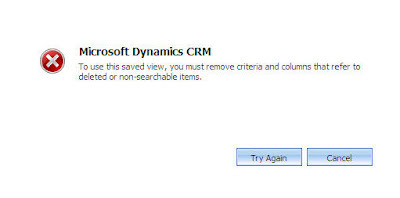
MS CRM 4.0 Relationship Mappings Error

Image
Whenever relationship is deleted but relationship attribute is used in another relationship mappings. In that case if you click on mappings you will get below error message. Cause: attribute is deleted but attribute is used in attribute mappings. In MS CRM attribute relationship mappings are saved in following tables E ntityMapBase AttributeMapBase Identify the mapping record in EntityMapBase Table. Take the GUID of that record and find the related attribue records in AttributeMapTable select * from dbo . AttributeMapBase where EntityMapId = 'place your relationship record GUID' update the your deleted attribute records DeletionStateCode with 2.

Web.Config Settings for Custom Aspx Application integration with MS CRM 4.0

MS CRM 4.0 implements the http models for multi tendency. We need to remove these models for our custom aspx application. < httpModules > < remove name = "CrmAuthentication"/> < remove name = "MapOrg"/> </ httpModules > Or < httpModules > < Clear /> </ httpModules > Another Way to read your Owen App Settings is using System.Configuration; using System.Web.Configuration;      // ... Configuration configuration = WebConfigurationManager .OpenWebConfiguration( "/ISV/MyApp" ); string myParameter = configuration.AppSettings.Settings[ "MyParameter" ].Value;